Change my avatar / photo? Item #74600

How do I change my avatar / photo?

To change your Avatar / Photo from the grey head icon shown in the Stream:

(1) Select the Community tab,

(2) Click the Change my avatar / photo link (illustrated below), and
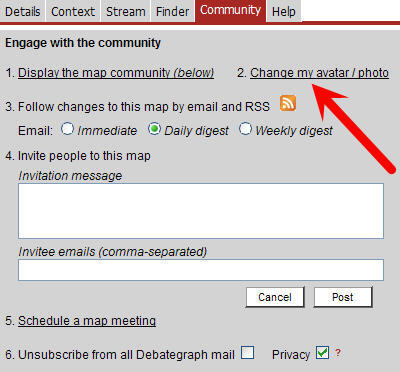
(3) Follow the instructions on dialog box that opens.

You can also use this picture dialog box to add or change the personal URL associated with your profile.


PAGE NAVIGATOR(Help)
Map HomeDebateGraph
SubSectionHelp
ItemFAQ
ItemChange my avatar / photo?
CommentsAdd a comment
Metadata

Entered by:- David Price
Entry date (GMT): 9/29/2010 11:15:00 PM
Last edit date (GMT): 9/29/2010 11:16:00 PM
Incoming cross-relations: 0
Outgoing cross-relations: 0
Average rating: 0 by 0 users