As well as starting a new map – which you can do at any time using the New map button beneath the map – you are welcome to help improve of existing public maps by:
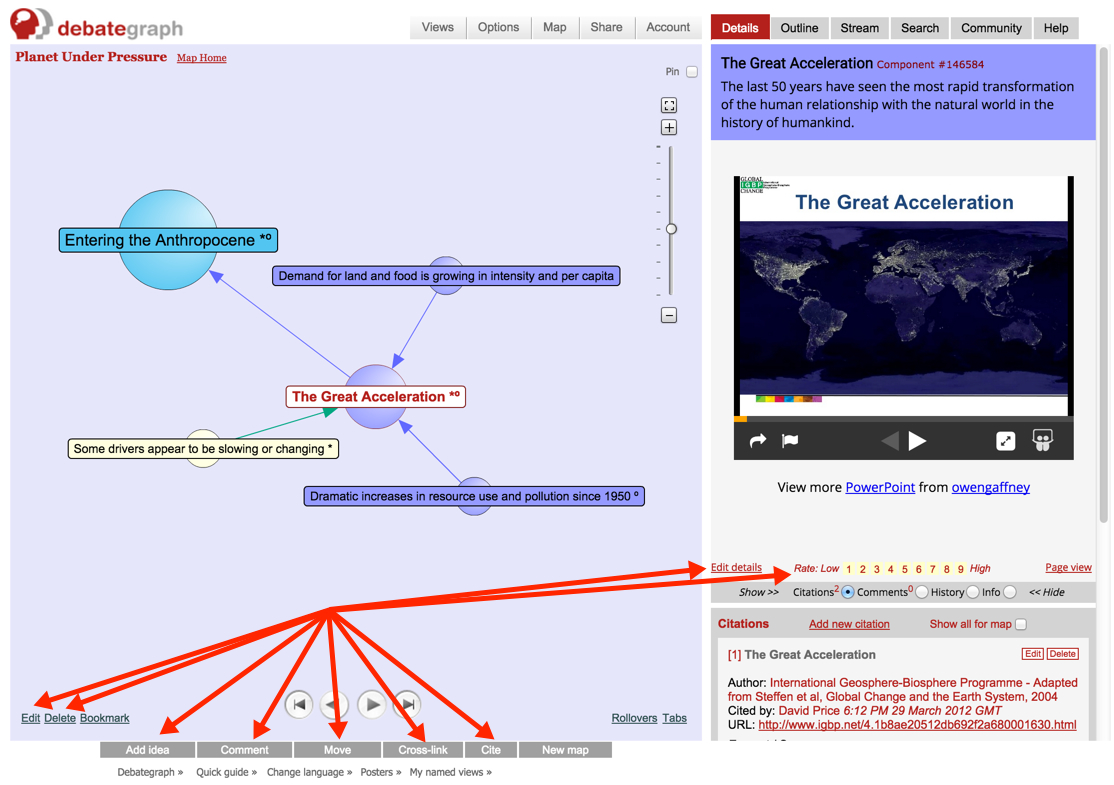
(1)
Adding a Comment to an idea by clicking on the
Comment button beneath the map. Comments (which can include links) allow conversations to build about specific ideas (or the map as a whole) and are a quick and simple way to offer feedback and suggestions for further improvement.
(2)
Rating an idea by clicking on the
Rating scale shown at the bottom of the
Details text (on the right). Rating ideas helps everyone to see which ideas are perceived to be the most important by the community (and why).
(3)
Adding a Citation to an idea using the
Cite button beneath the map. Citations are references to articles or papers that are relevant to a particular idea (and/or to the subject of the map as a whole).
(4)
Adding a new idea to the map using the
Add idea button beneath the map – which adds and connects your new idea to the idea currently selected on the map. When adding a new idea, it's always fine to use the default
Issue idea type (which can be changed later at any time).
(5)
Editing an existing idea using the
Edit link (bottom left on the map) or the
Edit details link (at the bottom left of the Details text area, on the right of the screen). Each idea has a full
Edit history; so you can always revert to an earlier version of the idea at any time.
...and each of the above ways of participating is explained in more detail in its own section of the Help tab – which is always accessible at the top right of the screen – and if you have any questions at any time we would love to hear from you at help@debategraph.org!